Launching QRdx: An Open-Source QR Code Platform
QRdx is a free, open-source QR code generator with dynamic codes, hosted pages and scan analytics, plus an image API, a REST API and an MCP server.


On this page
QRdx is an open-source QR code platform. You design a QR code in your browser at qrdx.dev and download it with no account and no watermark. A free account adds dynamic codes you can change after printing, with scan analytics. Developers can make codes from a URL, the REST API or the MCP server. All of the code is on GitHub.
Free, with no account
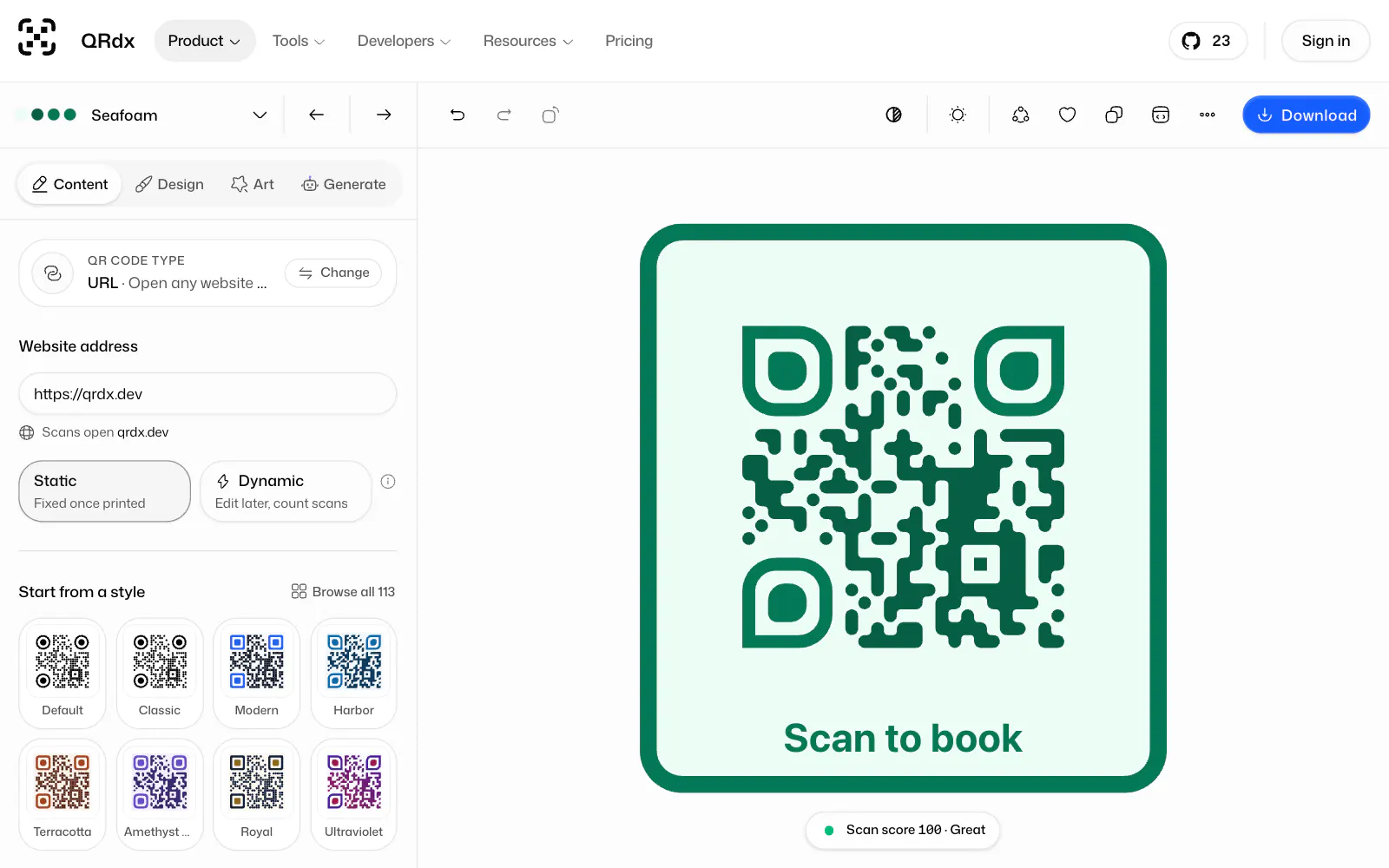
The playground is the generator. Pick what the code holds, such as a link, Wi-Fi details, a contact card or a UPI payment. Start from a ready-made style, or build your own from 23 body patterns, 17 corner-eye shapes, 21 eye centers, 19 call-to-action frames and a logo.
Before you download, the scan score checks the design. It renders the code in your browser at 96, 160 and 320 pixels, lowers the contrast and blurs it the way a phone camera would, then decodes it and checks that the text matches what you typed. If a size fails, it tells you what to change, like raising the contrast or using bigger dots.
Downloads come as PNG, JPG, SVG, PDF or EPS. For a print shop, the Print-ready tab sets the code's width in millimeters or inches, RGB or CMYK, a 3 mm bleed and crop marks on the PDF.
A static code keeps its content inside the code, so it never expires, has no scan limit and never passes through QRdx's servers. A few other free tools run in your browser too: a bulk generator that turns a CSV into up to 5,000 codes, a scanner, a scan checker for an image you already have, and a print size calculator.
What's in the playground
The Design tab has a new color picker. The background, foreground, eyes and dots can each be a solid color or a linear, radial or angular gradient, and any color can be see-through. The picker's Image tab paints a photo through the background, the dots or the eyes. A photo's detail is hard for a camera to read, so the scan score asks for more contrast there, and Make it scannable finds a setting that passes. PNG, SVG and PDF downloads keep the photo. EPS can't, so image fills are left out of it.
Frame text is edited where it's drawn. Click the label in the preview, type, and a small menu next to it changes the text size, the text and frame colors and the icon. Enter keeps the edit as one undo step, and Escape puts the frame back.
The Art tab holds Logo QR and Image QR, which blend a logo or a photo into the dots themselves. They're drawn as vectors with no AI involved, so they work in every download format. Signed in, you can also generate AI art, which paints a scene into the code and checks that the result scans. The Free plan includes 3 AI art images a month.
The Generate tab makes or changes a design from a sentence you type. It also needs an account.
Get code turns the current design into an image URL, a REST API request or arguments for the MCP server. The More menu opens the bulk generator with your current style, and a photo check that reads a picture of your printed code in the browser and tells you whether it opens the right link. Nothing is uploaded.
The community shares themes and frames that people made, all free to use under CC0. You can browse it from a panel next to the preview and apply a theme from there.
What an account adds
A dynamic code holds a short link instead, so you can change where it points after printing and see when, where and on which device people scanned it. It can also open a hosted mobile page, like a link list, a menu, a contact card, a coupon, an event or a form.
The dashboard is organized by workspace, and each workspace has its own address. Codes show as cards or rows, with filters, folders and search. A new code opens in a window with a live preview and the scan score, and you can paste a web address anywhere on the dashboard to start one. Teammates can have view-only or billing roles, and a code can move to another workspace without changing its short link.
The Free plan includes 10 dynamic codes, 3 hosted pages and 90 days of analytics history. Pro costs $5 a month. It makes codes and pages unlimited and adds smart routing, A/B tests, passwords, schedules, tracking pixels and teams of up to 3 people, plus 5 custom domains. Business costs $15 a month and adds webhooks, conversion tracking, white-label pages and unlimited team members. The pricing page has the whole list.
Scans are unlimited on every plan. Under the Never-Hostage Guarantee, every dynamic code keeps redirecting after a downgrade, a failed payment or a cancellation, and going over a limit only stops you from creating more. If QRdx ever shuts down, you get at least 12 months' notice and a documented way to run the open-source app yourself.
Open source

The whole web app is open source under the AGPL-3.0, including the editor, accounts, dynamic codes, hosted pages, teams and the docs. You can run it on your own server with Docker Compose or Node.js, against Postgres or a Neon database. The self-hosting guide has the steps. It also says that the Docker setup is new, so if something breaks, please open an issue. The plan limits are defined in one file, so you can change them for your own instance.
The parts you'd build into your own work are MIT-licensed: the qrdx engine and React library, the @qrdx/cli command-line tool, and the plugins for Chrome, Figma, Raycast and Canva. The Chrome extension is in the Chrome Web Store. The other three aren't in their stores yet, so you install them from source.
The QRdx name and logo aren't covered by those licenses. If you run a modified version for other people, give it your own name. The trademark policy explains what's fine.
For developers

The quickest way to get a QR code from code is the image API. It's a URL that returns an SVG, PNG or EPS:
It takes the playground's styles too, including gradients, frames, borders, eye and dot colors and logo icons. It needs no key, except to draw a logo you uploaded to QRdx. Image fills, Logo QR and Image QR are playground-only for now.
The MCP server at https://mcp.qrdx.dev/mcp lets Claude, ChatGPT, Cursor, VS Code and other MCP apps make styled QR codes in a chat. Its design_qr tool checks the scan score, fixes the style until the code scans well, and returns a link that opens the design in the playground. It also builds the payloads that are easy to get wrong by hand, like Wi-Fi details with a semicolon in the network name. It needs no account or key. With a QRdx API key on the connection, it can also save a design as a theme in your workspace. In Claude Code:
claude mcp add --transport http qrdx https://mcp.qrdx.dev/mcpThe REST API at https://api.qrdx.dev/v1 creates and edits dynamic codes, reads scan analytics and reports conversions. It takes an API key you create in settings, or an OAuth 2.0 access token when your app acts for other QRdx users. The OpenAPI 3.1 document is at qrdx.dev/openapi.json, and a Free account can make 1,000 requests a day. On Business, signed webhooks send scans, code changes and form responses to your own URL.
The qrdx package renders and exports styled codes in React, and the shadcn/ui registry has ready-made components built on it, such as a scanner and a Wi-Fi code.
qrdx 0.0.47 isn't on npm yet
npm install qrdx still installs 0.0.46. Its basic QRCode works, but most patterns, frames, Art QR, EPS export and the scan score came later, and 0.0.46 lists React 19, sharp and jspdf as its own dependencies. Until the release is out, use every option in the playground, or render images from a URL with the Image API.
The same engine powers a command-line tool, @qrdx/cli.
@qrdx/cli 0.0.5 isn't on npm yet
npx @qrdx/cli still runs 0.0.4, which has the qrdx 0.0.46 styles and no --format or --frame options, and writes SVG into a file named qr.eps. For EPS today, use the Image API: curl -o qr.eps "https://api.qrdx.dev/v1/qr?data=https://example.com&format=eps". For frames, download from the playground.
The QR code API guide has working examples for each of these.
What's not there yet
QRdx doesn't have its own two-step verification, passkeys or single sign-on yet. You sign in with Google, GitHub or a one-time email code. The site is in English only. The Figma, Raycast and Canva plugins install from source until they're listed in their stores.
If you find something that doesn't work, or a code the scan score rates well that your phone won't read, open an issue.
If QRdx is useful to you, a star on GitHub helps other people find it:

